Percent Stacked Column Chart
A Percent Stacked Column Chart is a multi-series Column Chart which presents the contribution of each value to the sum of all values across categories. Y-axis is intended for percentage terms (from 0 to 100).
Stacked Column Chart
Stacked Column Charts display the comparison of the quantitative value each part of the category brings to the whole category. Each of the stack components shows its relative contribution to the entire bar and the entity as a whole.
100 Percent Stacked Column Chart
The 100% Stacked Column Chart displays the comparison of the percentage each part of the category brings to the whole category. This chart shows the products sales ratio in several regions.
Column Chart
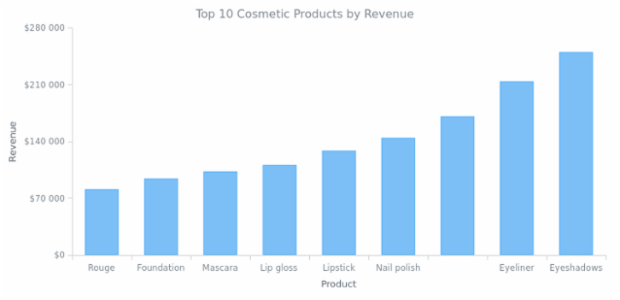
Column chart is a kind of bar chart with vertically plotted rectangular bars (columns). This is a basic column chart that shows the income of the company by product.
Column, Spline-Area and Spline Chart
Three different series combined together on one chart with a basic and a secondary Y-Axes.
Line Chart with Logarithmic Scale
Customers activity line chart with logarithmic scale to show data set with a big difference between the values.
Multi-Series Column Chart
Multi-series column chart shows the information about revenue from selling the several products in several states. All series have labels over the columns.
Stacked Area Chart
Stacked Area Charts with Region-wise sales information. Stacked mode helps to present data as a sum of a whole.
AnyChart - JavaScript Charts designed to be embedded and integrated
Column Chart with Columns Overlap
Column chart compares revenue in two regions. Series are shifted in order to make the columns of two different series overlap one another. Legend is interactive and can be used to hide and show series.