Step-Line Chart
Multi-series Step line chart shows the customer's satisfaction changes over an year. Series represent positive, negative and neutral comments on a site.
BCT Stacked Column Chart
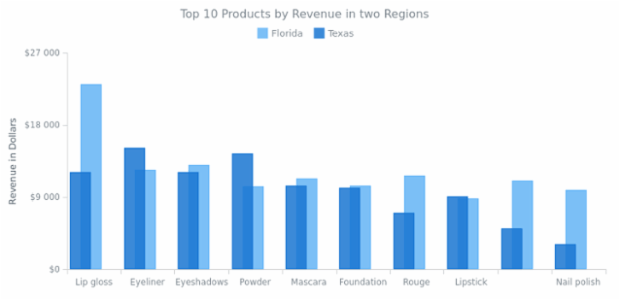
Column Chart with Columns Overlap
Column chart compares revenue in two regions. Series are shifted in order to make the columns of two different series overlap one another. Legend is interactive and can be used to hide and show series.
BCT Pointers-and-Data Marker 05
Stacked Bar Chart
Stacked Bar chart displays sales breakdown for multiple products in several regions. Stacked mode helps to concentrate on comparing sales in all regions while being able to compare total sales as well.
100 Percent Stacked Bar Chart
100% Stacked Bar Charts display the comparison of the percentage, taking the whole category as 100%. Chart describes the products' sales ratio by four regions. The legend is interactive and controls chart series.
Analog Watch
Here is the gauge that simulates analog watch. It has three needles (for hour, minute and second hands) and two axes. Chart's knob connects all needles. One of the chart's labels is responsible for displaying the current date.
Combination of Line and Marker Charts
This scatter chart visualize the distribution of periods in time when system was interrupted contains two series: the first one is line series and it represents the average (mean) values and the markers series shows shows the distribution itself.
Multi-Series 3D Column Chart with Z Distribution
A chart of four series demonstrating sales of 3 top cosmetic products in four states. The third dimension axis (Z-Axis) is used for distributing the columns that stand for different series.
Stacked Bar Chart with Negative Values
Stacked bar charts are used to compare the quantitative value each part of the category brings to the whole category. This chart shows the distribution of the revenue got from the cosmetic products sold to men and women.
3D Column Chart with Columns Overlap
A Column Chart describing sales in Florida and Texas. It demonstrates two features: how to make a 3D Column Chart and the overlapping feature for the points.