Single-Series Spline-Area Chart
Single Series Spline chart shows temperature changes during one month. Spline with smooth angles puts accent to the fact that temperature changes gradually.
100 Percent Stacked Bar Chart
100% Stacked Bar Charts display the comparison of the percentage, taking the whole category as 100%. Chart describes the products' sales ratio by four regions. The legend is interactive and controls chart series.
BCT Stacked Column Chart
Column Chart
AnyChart - JavaScript Charts designed to be embedded and integrated
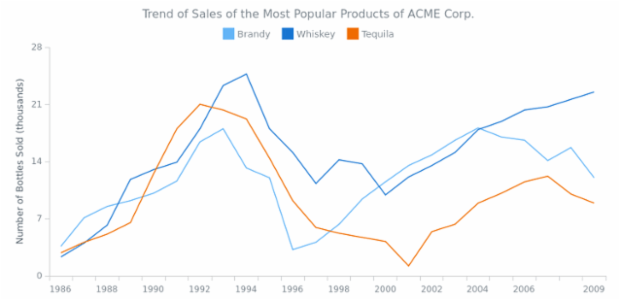
Line Chart
Basic multi-series line chart that shows the changes the different product sales changes over time.
Multi-Series Column Chart
Multi-series column chart shows the information about revenue from selling the several products in several states. All series have labels over the columns.
Multiple Charts at Stage
Dashboard with six charts with information on New Year's parties of ACME Corp. The main purpose of this dashboard is to demonstrate general appearance of a simple dashboard.
Stacked Bar Chart
Stacked Bar chart displays sales breakdown for multiple products in several regions. Stacked mode helps to concentrate on comparing sales in all regions while being able to compare total sales as well.
Combination of 3D-Line and 3D-Column Chart
3D Line and 3D Column Chart combination example.